Automated Billing
Reduce manual invoice processing.

AT2Sage connects your Autotask PSA directly to Sage 50, eliminating manual invoice entry, reducing errors, and keeping your accounts in perfect sync.
Free, fully functional 30 day trial. Subscriptions from £595 + VAT a year.
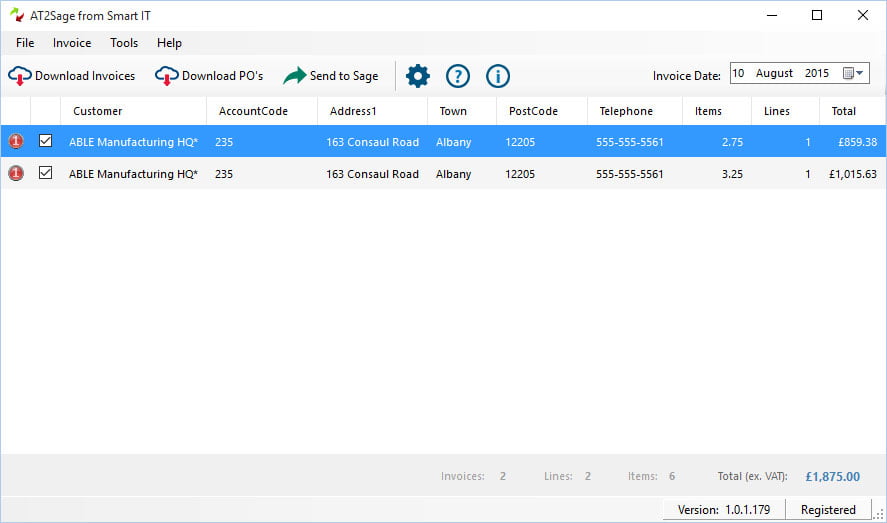


AT2Sage automatically synchronises invoice data from Autotask into Sage, eliminating manual data entry and reducing the time spent managing your financial processes.
Designed specifically for Managed Service Providers, AT2Sage helps streamline billing workflows, improve accuracy and ensure your accounting records remain up to date.
Reduce manual invoice processing.
Keep financial records aligned.
Save time across finance and operations.
Reduce human error and duplicate entry.
Manually transferring invoice information between your PSA and accounting platform is time-consuming, inefficient and prone to errors.
AT2Sage automates the process, allowing your team to:
AT2Sage does more than copy invoice totals. It keeps customers, codes and tax in step so Sage is right first time.
Download Autotask purchase orders and send them to Sage 50 alongside your invoices, with supplier accounts matched by account number or created when missing.
Autotask accounts are matched to Sage by account number. Missing customers are created, and names, addresses and phone numbers are updated from Autotask.
Map Autotask billing codes to Sage nominal codes, so bench work, onsite support and other services post to the right accounts for better reporting.
Choose exactly what each invoice line shows using variables such as ticket title, ticket number, contract name and service period.
Items are sent to Sage excluding VAT with the correct Sage tax code, taken from the customer account or the product, whichever suits your setup.
Negative lines on Autotask invoices are handled for you, including creating separate credit notes for older versions of Sage 50.
After each Send To Sage, get a report of every new customer and invoice created in Sage, on screen or by email.
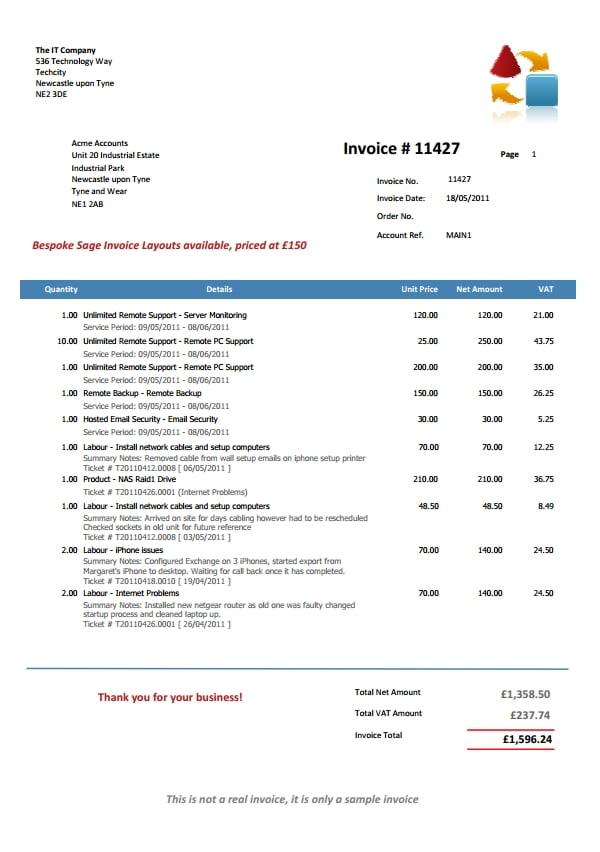
Includes a free Sage 50 invoice template you can customise to show ticket titles and other Autotask detail your customers want to see.
Your invoices will include all the necessary information your customer wants to see, such as period dates for services, ticket numbers, dates and engineers notes.
You can switch fields off and on, and group tickets/contracts to make your invoices easier to read.
Also included is a free Sage Accounts invoice template, similar to the example shown here. You’re free to customise this any way you like.
AT2Sage runs on the same computer as Sage 50. Set it up once, then post a month of Autotask invoices to Sage in a few clicks.
Install AT2Sage on the same computer as Sage 50, then enter your serial code or start your free 30 day trial.
Your Autotask administrator enables the AT2Sage integration and creates a free API user for it.
Enter your API details and test the connection, then enable Sage's third party integration so AT2Sage can post to Sage.
Download invoices by date range, edit anything you need, then click Send To Sage.

AT2Sage wasn't created by a software company trying to understand MSPs.
It was developed by an MSP that needed a better way to manage its own invoicing processes.
Today, AT2Sage continues to help service providers automate financial workflows, reduce administration and improve operational efficiency.
★★★★★
We would highly recommend AT2Sage – it is a great time saving solution for us when it comes to billing out of Autotask. It allows us to keep an audit trail of invoices generated within Autotask for each customer plus have our sales invoices posted in Sage in a few short time saving steps.
★★★★★
We have been using AT2Sage for over a year to automate the import of Invoices generated within AutoTask over to our Sage 50 Accounts, this has saved us countless hours and gives us the best of both worlds. The Smart IT support team have always been quick to respond to emails and the software is updated whenever AutoTask change their systems
★★★★★
AT2Sage was a perfect solution to big integration issue between Autotask and UK customers using Sage Accounts. We would not have been able to move to Autotask without this bit of software, the link it creates between Autotask and Sage is fantastic. It keeps our customer records up to date and transfers all invoice data over to our accounts package with so much more detail that the standard Autotask export feature. I would highly recommend this product and think it is a must for anyone using Sage Accounts and Autotask.
★★★★★
I’m so impressed with AT2Sage that I have recommended it to several other Autotask users and will continue to do so. It’s well worth the money for the time you’ll save posting Autotask invoices to Sage in any other way.
★★★★★
We had great support from SmartIT during the initial setup. It can’t be easy providing technical support to a technical support company – the only way to do it is very, very well.
★★★★★
AT2Sage was simple to install and easy to understand. It just worked, and instantly saved us time. Within ten minutes we were using it to post invoices to Sage. We had been posting Autotask invoices manually into Sage, which was a real chore and now the same process now only takes seconds. It also eliminates the odd manual error that would inevitably occur from time to time.
★★★★★
We email our invoices for recurring contracts and chargeable labour from Autotask, whilst still raising other invoices in Sage. AT2Sage transfers the Autotask-generated invoice numbers to Sage, which means we can easily identify which invoices have come from Autotask, and which come from Sage. With AT2Sage we can use Autotask to do what it is good at and Sage to do what it is good at too.
★★★★★
A valuable tool that saves hours from not having to manually input invoices into Sage. Easy to use and SmartIT helpful when problems occur.

Free, fully functional 30 day trial with all the support you need to get up and running. Make sure AT2Sage works for you before buying.
AT2Sage has been updated to be compatible with TLS 1.2.
When you’re ready to buy, use the purchase form to buy your AT2Sage serial number.
AT2Sage is available as 1, 2 or 3 year subscriptions and includes all updates and support during your subscription term. Updates will be delivered automatically to your software, support is available by contacting us via our contact page.
AT2Sage works with UK and Ireland editions of Sage 50 Accounts, version 23 to 32 (2026). Please check the compatibility guide before updating Sage.
To send invoices to Sage, Sage's SDO engine needs to be enabled. You can do this in Sage under Tools, Activation, Enable 3rd Party Integration, using a serial number and activation key from Sage. Sage doesn't currently charge for these.
Yes. AT2Sage downloads Autotask purchase orders and sends them to Sage 50, matching supplier accounts by account number or creating them when they're missing.
Yes. If you uninstall AT2Sage, rebuild your computer or replace it, you can transfer your licence to another computer and copy your settings across.
A refund is available within 14 days of purchase as long as the serial number hasn't been registered. Once a serial number is registered it can't be refunded or resold.
Yes. Customers switching to Xero can trade in their AT2Sage licence for a free upSync licence, valid for the time left on the AT2Sage licence up to a maximum of 12 months.
More answers in the AT2Sage knowledge base.
Try AT2Sage free for 30 days and post your next invoice run to Sage 50 in minutes.
Need help? Browse the AT2Sage knowledge base.